Gear on Mobile: porting Gear engine to Android AArch64
Over 3.8 billion people worldwide use Android, so we asked ourselves: what if we gave people to use Gear ecosystem to develop their ideas into blockchain applications that fit in their pocket? It doesn’t matter what smartphone you own, where you live, or what your income is; you can use our ecosystem even on $250 phone. And yes, it is possible - we have launched Gear and our Sails framework! This idea is particularly interesting because AIs like Claude Code can also be run directly on phone, eliminating all complexities inherent in world of software development. This could be very interesting in developing countries!
Installing Termux terminal emulator & building Gear smart contracts#
Please note that certain features related to Termux app are blocked on Google Play (use F-Droid!). In my case, I also had to click “Install anyway” button due to some security checks.
After opening Termux app, you will see something like this: ~ $ - this is bash prompt. All interaction will take place via text commands in bash.

To begin with, environment needs to be prepared. You can copy commands one by one and paste them into Termux, this is recommended method. Please note that it is recommended to run this on phone with available storage and, ideally, mid-range processor.
# Use arrow keys to navigate, spacebar to select nearest server
# Then press "Enter"
termux-change-repo
# Update all packages
yes | pkg upgrade

# Click "Allow" if prompted for file storage permissions
termux-setup-storage
# Install all dependencies
pkg install --yes binaryen git rust rust-std-wasm32v1-none tree zsh

# Install Oh My Zsh
sh -c "$(curl -fsSL https://raw.githubusercontent.com/ohmyzsh/ohmyzsh/master/tools/install.sh)" "" --unattended
# Change shell to zsh, switch to zsh
chsh -s zsh && zsh
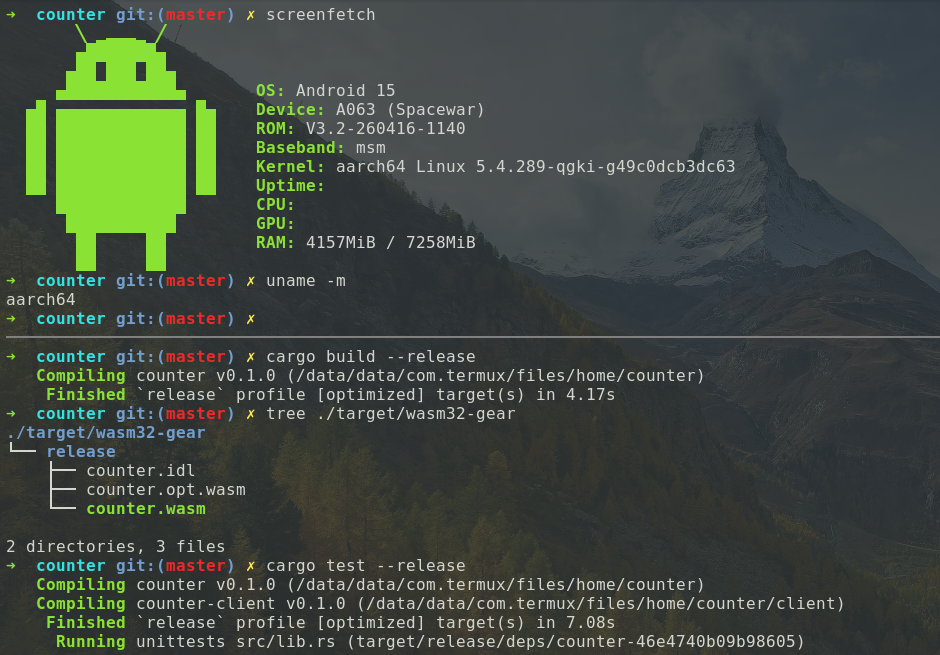
Wait moment until rainbow-colored message from Oh My Zsh appears. Now we will create “counter” smart contract for Vara Network. You can pass --eth to cargo sails new command if you want to create it for Vara.ETH. Also, note that compiling Rust code takes quite a bit of time, but subsequent builds are incremental, allowing you to modify code quickly. On low-end phones, this process can take up to 10-15 minutes.
# Install Sails CLI from source
cargo install sails-cli@=1.0.1

# Create new "counter" smart contract
cargo sails new counter
# Move to folder "counter"
cd counter

# Compile WASM
cargo build --release
tree ./target/wasm32-gear

# Run tests - essentially, launch Gear engine on phone!
cargo test --release
As you can see, WASM compiles in 5 minutes, which is quite acceptable - especially considering it was tested on Nothing Phone (1), not exactly flagship device. Tests take 11 minutes to compile, which is quite long time. Success(Auto) output essentially means that we’ve launched Gear engine on phone! This is response from actor model. In reality, developer could use gstd library instead of Sails framework to speed up build. We have occasionally encountered “Text file too busy” error due to CPU overload; simply restart build or use -j 1.
Finished `release` profile [optimized] target(s) in 5m 36s
./target/wasm32-gear
└── release
    ├── counter.idl
    ├── counter.opt.wasm
    └── counter.wasm

Finished `release` profile [optimized] target(s) in 11m 12s
Running tests/gtest.rs (target/release/deps/gtest-f66cd164751c1e35)

DEBUG do_something_works Send activation id: 0x..., to program: 0x...
DEBUG do_something_works PendingCtor: send message 0x...
DEBUG do_something_works Process block #1 run result, mode UpTo(600)
DEBUG do_something_works Extract reply from entry CoreLog {
    id: 0x..., source: 0x..., destination: 0x...,
    payload: 0x, reply_code: Some(Success(Auto)), reply_to: Some(0x...)
}
DEBUG do_something_works Send message id: 0x..., to: 0x..., payload: ...
DEBUG do_something_works PendingCall: send message 0x...
If you want to copy resulting WASM / IDL file to root folder of phone’s storage, use following command:
cp ./target/wasm32-gear/release/counter.opt.wasm ~/storage/shared
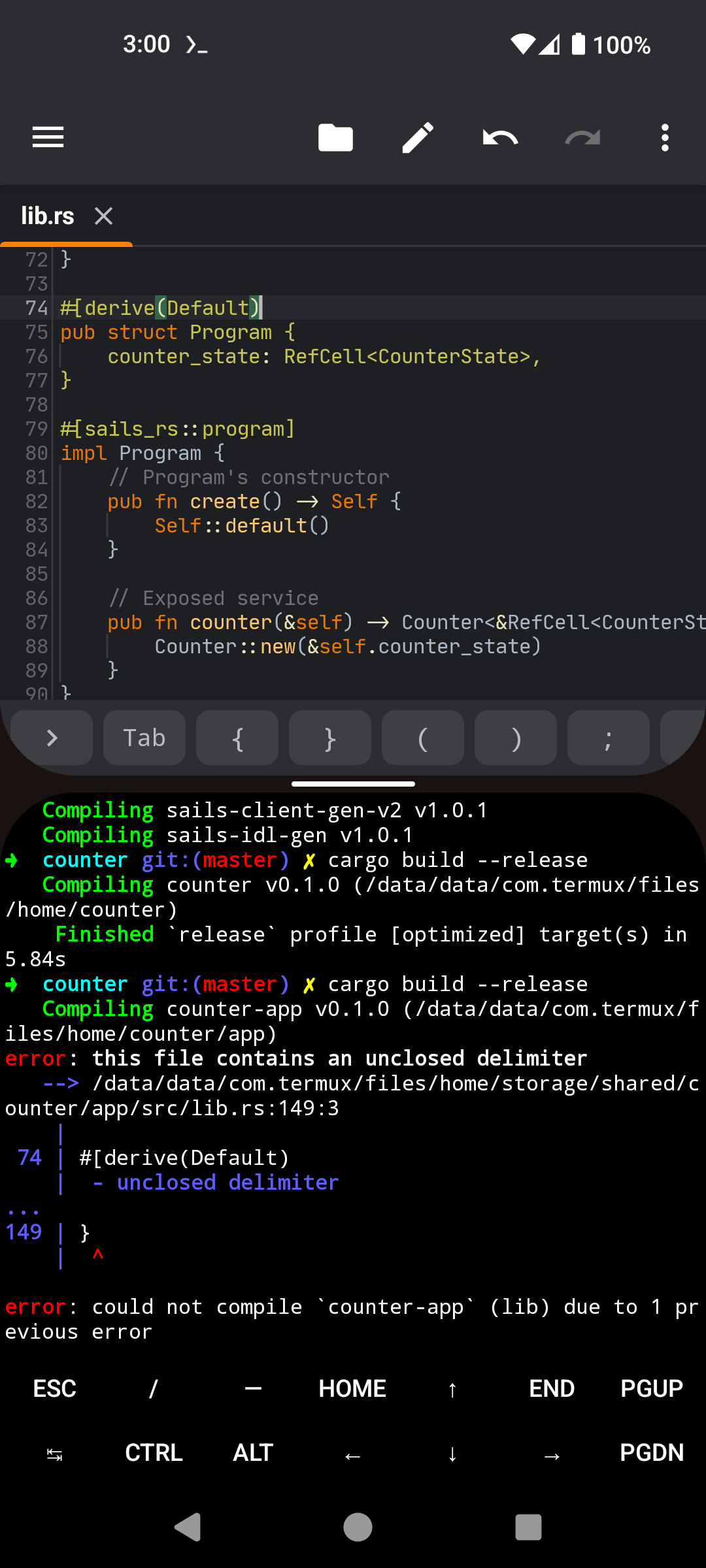
You can also use include!(...) hack to create smart contract project directly in phone’s root folder (since you likely won’t have permissions to do so otherwise without root access). This is because executable files do not work there, although you can still build WASM inside Termux and upload it to Gear IDEA / Vara.ETH IDEA, and use graphical code editors like Squircle CE without needing terminal for coding (without using vim or nano). Terminal will be used only for recompilation.
# Recreate project with link to `~/storage/shared`
cd ~
rm -rf counter
cargo sails new counter
cd counter
mkdir -p ~/storage/shared/counter/app/src
tail -n +3 app/src/lib.rs > ~/storage/shared/counter/app/src/lib.rs
SHARED_LIB="$HOME/storage/shared/counter/app/src/lib.rs"
cat > app/src/lib.rs <<EOF
#![no_std]

include!("$SHARED_LIB");
EOF
Our recompilation and graphical code editor are working:
What patches were applied to Gear to achieve this?#
Most of patches involved replacing #[cfg(target_os = "linux")] with #[cfg(any(target_os = "linux", target_os = "android"))] in gear-dlmalloc and gear-lazy-pages packages. Main issue with patching gear-lazy-pages was that it used libc::ucontext_t type, and its definition in rust-lang/libc did not match Android NDK source. Problem turned out to be that Android has additional __padding field:
typedef struct ucontext {
    /* The kernel adds extra padding after uc_sigmask
       to match glibc sigset_t on ARM64. */
    char __padding[128 - sizeof(sigset_t)];
} ucontext_t;
Most complex part of the patch looks like this:
cfg_if! {
    if #[cfg(all(
        any(target_os = "linux", target_os = "android") // <--
        target_arch = "x86_64"
    ))] {
        unsafe fn ucontext_get_write(
            ucontext: *mut nix::libc::ucontext_t
        ) -> Option<bool> {
            let error_reg = nix::libc::REG_ERR as usize;
            let error_code = unsafe { *ucontext }.uc_mcontext.gregs[error_reg];
            Some(error_code & 0b10 == 0b10)
        }
    } else if #[cfg(all(
        any(target_os = "linux", target_os = "android") // <--
        target_arch = "aarch64"
    ))] {
        unsafe fn ucontext_get_write(
            ucontext: *mut nix::libc::ucontext_t
        ) -> Option<bool> {
            #[cfg(target_os = "android")] // <--
            #[repr(C)]
            pub struct android_ucontext_t {
                pub uc_flags: nix::libc::c_ulong,
                pub uc_link: *mut nix::libc::ucontext_t,
                pub uc_stack: nix::libc::stack_t,
                pub uc_sigmask: nix::libc::sigset_t,
                pub __padding: [u8; 128 - size_of::<nix::libc::sigset_t>()],
                //  ^^^ android specific
                pub uc_mcontext: nix::libc::mcontext_t,
            }
            #[cfg(target_os = "android")] // <--
            let ucontext = ucontext as *mut android_ucontext_t;
            let esr = unix_aarch64::get_esr(&unsafe { &*ucontext }.uc_mcontext)
                .expect("Failed to get ESR");
            let is_wnr = (esr & 0b100_0000) != 0;
            Some(is_wnr)
        }
    }
}
This also revealed another issue with gear-wasm-optimizer package, as it requires rustup command to be present on system - something that might be missing in Termux or some Linux environments.